TLS Endpoints
Add any TLS server to the guardian's watch list, and the guardian probes it every six hours. Each probe checks for post-quantum key exchange and reads the certificate the server sends.
- Where
- Discover › TLS endpoints
- Who
- Auditors and above; managers and above to watch
Before You Begin
Auditors and above can see the endpoints. To watch, probe or stop watching an endpoint, you need the manager role or higher.
The guardian probes from its own host, so that host must be able to reach the server on the port you give. For the guardian's outbound connections, see Hosting and Exposure.
Watching an Endpoint
Open Discover › TLS endpoints and select Watch endpoint. You can also choose Watch endpoint in the command palette.
Reading the Results
A probe is a single TLS handshake from the guardian, with no application data sent. After a probe, each endpoint has one of these statuses:
| Status | Meaning |
|---|---|
| Passing | The key exchange uses ML-KEM, alone or in a hybrid: X25519MLKEM768, SecP256r1MLKEM768, SecP384r1MLKEM1024 or ML-KEM-1024. |
| Failing | The server agreed to a classical key exchange. |
| Unreachable | The guardian could not reach the server. Unreachable endpoints are counted separately from failing ones. |
| Pending | The endpoint has not been probed yet. |
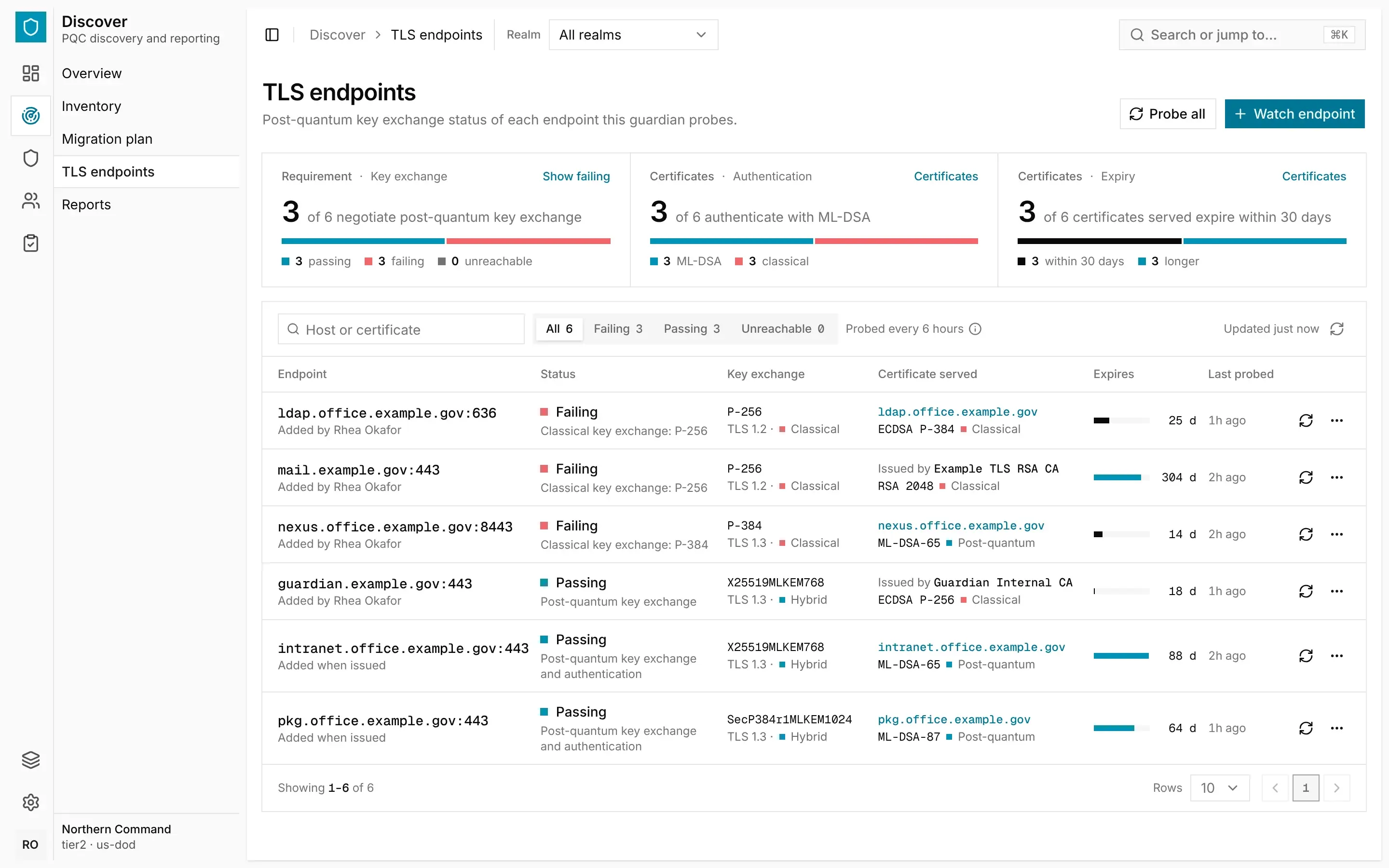
The tiles at the top summarise the endpoints. Key exchange counts how many pass. Authentication compares how many certificates are signed with ML-DSA and how many with a classical algorithm. Expiry counts the certificates that expire within 30 days.
To narrow the list, choose Failing, Passing or Unreachable, or search by host or certificate.
The Certificate Served
Each probe reads the certificate the server sends. Certificate served names the certificate, and Expires shows how many days it has left.
- A certificate issued by this guardian is shown by its common name. Select the name to open the certificate. Its Endpoints tab lists every endpoint that serves it.
- A certificate from another issuer is shown as Issued by followed by the issuer's name. Its expiry date comes from the probe, and its days left are shown in the same way.
When you issue a server certificate, the guardian starts watching its name on port 443 straight away. That endpoint is labelled Added when issued. See Certificates and Authorities.
Probing and Stopping
To probe every endpoint now, select Probe all. To probe one, select Probe now on its row.
To stop watching an endpoint, open the menu at the end of its row and select Stop watching.
The guardian records each endpoint you start or stop watching, and each change in a probe's result, in the certificate record. You can read the record in Manage › Activity.